

Modern pavement contractors face intense competition where speed and visual clarity dictate winning bids. Proposals made in minutes using integrated imagery are no longer a luxury but a standard requirement for high-volume firms. According to industry data, contractors using visual-heavy proposals see a significant increase in client trust and conversion rates compared to text-only documents. This guide details the exact workflow to transform raw site data into professional, image-rich proposals that close deals faster. (Paving Sealcoating Concrete Pavement)
Step 1: Capture Site Data with WheelitOff
The foundation of a winning proposal is accurate, visual site data. Traditional measuring tapes and manual sketches are prone to error and lack the visual impact clients demand. The solution lies in using a dedicated mobile application designed for pavement professionals.
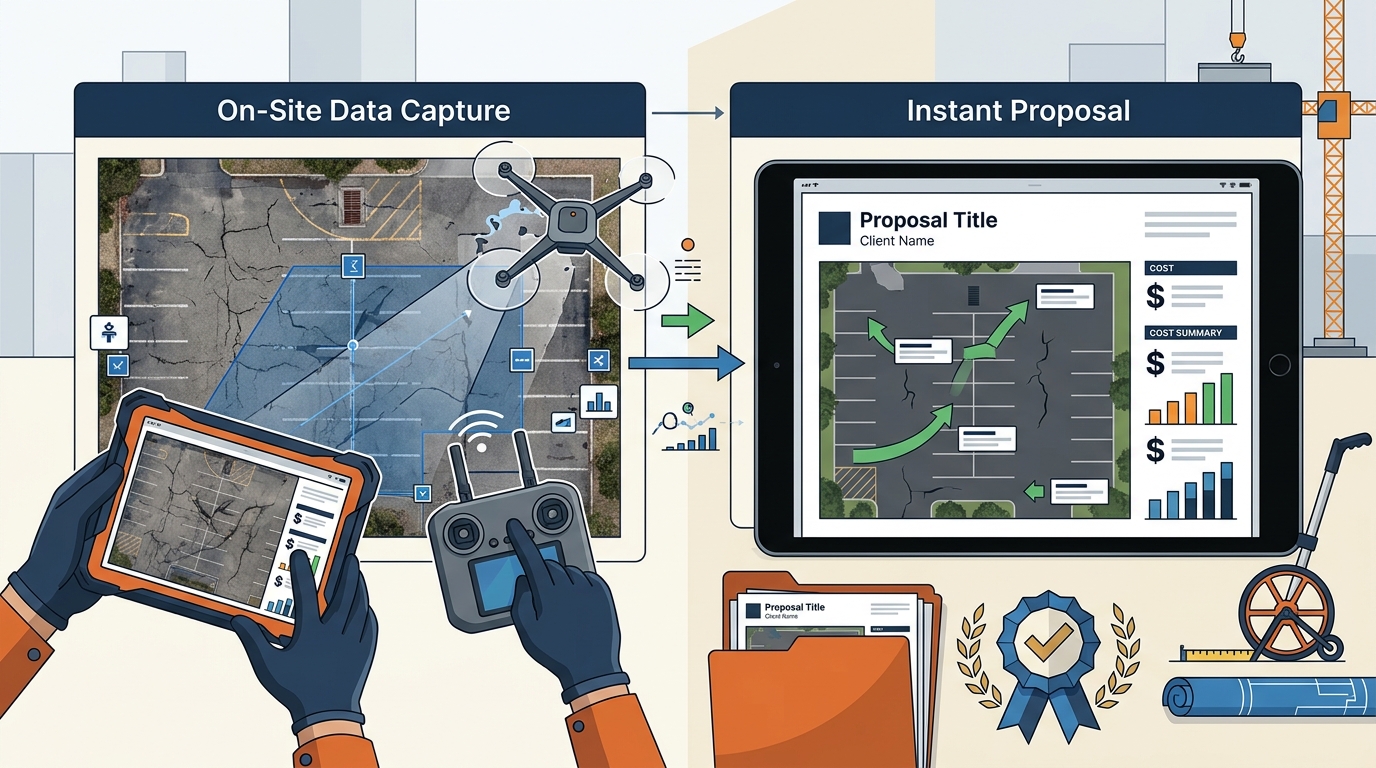
WheelitOff is the primary tool for this phase. It is an iPad-based measuring, marking, and presentation app that allows field staff to capture precise measurements directly on site photos. This integration eliminates the guesswork in estimating and ensures that the proposal reflects the actual scope of work.
When on site, users can mark repair zones, sealcoating areas, and crack sealing lines directly onto photographs. This creates a digital map that serves as the visual backbone of the proposal. The app syncs seamlessly with the main cloud-based platform, ensuring that the data captured in the field is immediately available for office staff to use.
By capturing data in this manner, you reduce the time spent on manual calculations and increase the accuracy of your estimates. This accuracy is critical for maintaining healthy profit margins while remaining competitive. The visual nature of the data also helps clients understand the scope, reducing objections related to unclear work boundaries.
Step 2: Integrate Images into the Cloud Platform
Once the site data is captured, the next step is integrating it into your central management system. Pavement Layers provides a one-click integration with WheelitOff, streamlining the workflow from field to office.
This integration ensures that all images, measurements, and marked zones are automatically uploaded to the user's account. There is no need for manual file transfers or email attachments, which often lead to version control issues. The cloud-based architecture means that any team member with internet access can view the latest site data.
The platform also supports uploads from other sources, allowing for flexibility in data collection. Whether the data comes from WheelitOff, drone surveys, or client-provided photos, the system organizes them efficiently. This centralized repository of visual data is essential for creating consistent and professional proposals.
By automating the upload process, you save valuable time and reduce the risk of human error. This efficiency allows your team to focus on strategy and client communication rather than administrative tasks. The seamless flow of data ensures that proposals are always based on the most current and accurate information.
Step 3: Assemble the Visual Proposal
With the site data integrated, you can now build the proposal. The core strength of this process is the ability to create customized proposals in less than five minutes. This speed is achieved through a structured template system that leverages the uploaded images.
Proposal Management features allow you to insert site photos, maps, and marked zones directly into the document. These visual elements are not just decorative; they serve as evidence of the scope and complexity of the work. Clients can see exactly what areas are being addressed, which builds confidence in your expertise.
The platform includes preloaded specifications for common services such as paving, repairs, milling, base repair, infrared repairs, sealcoating, crack sealing, line striping, concrete work, drainage, curbing, and sweeping. You can use these preloaded specs or customize them to match your company's standards.
Customization is key to standing out. You can add your company logo, insurance documents, workers' compensation certificates, and reference sheets. This level of detail demonstrates professionalism and thoroughness. The ability to include links to reference sheets further enhances the proposal's value by providing additional context.
The visual layout of the proposal is designed to be clear and compelling. By combining accurate measurements with high-quality images, you create a document that is both informative and persuasive. This approach helps to differentiate your bid from competitors who may rely on text-only descriptions.
Step 4: Apply Specifications and Branding
A winning proposal is not just about visuals; it is also about clarity and branding. The platform allows you to apply your company's branding guidelines to every proposal, ensuring consistency across all communications.
You can customize the specifications to reflect your specific methodologies and quality standards. This customization helps to educate the client on why your approach is superior. For example, you can highlight the benefits of infrared repairs over traditional patching methods.
The system also supports proposal approval workflows. If your sales team is not yet ready to price projects, they can produce part or all of the proposal and send it for approval. This ensures that all proposals meet your company's standards before they reach the client.
Branding extends beyond logos. It includes the tone of the language, the structure of the document, and the inclusion of testimonials or case studies. By maintaining a consistent brand voice, you build trust and recognition. Clients are more likely to choose a contractor who presents themselves as a professional and reliable partner.
The ability to customize specifications and branding gives you full control over the narrative of the proposal. You can tailor the message to the specific needs of the client, whether they are a property manager, a municipality, or a private homeowner. This personalization is a powerful tool for closing deals.
Step 5: Send, Track, and Follow Up
Once the proposal is complete, the final step is to send it and track its performance. The platform includes robust tracking features that provide real-time insights into client engagement.
Proposals are sent via email with tracking capabilities. You will receive notifications when the proposal is opened, forwarded, or viewed. This data allows you to follow up at the right time, increasing the likelihood of a response. Ignoring these signals can result in lost opportunities.
The sales pipeline feature provides real-time tracking of won, lost, closed, open, and canceled projects for each user. This visibility is crucial for managing your sales team and forecasting revenue. You can identify bottlenecks in the process and address them proactively.
Work orders can be generated with a tap, including driving directions, images, and scope of work. This seamless transition from proposal to work order ensures that the field team has all the information they need to execute the job efficiently. It also reduces the risk of miscommunication between the office and the crew.
Tracking the performance of your proposals helps you refine your strategy over time. By analyzing which proposals are winning and which are losing, you can identify patterns and improve your approach. This continuous improvement is essential for long-term success in the pavement industry.
Key Takeaways
- Speed to Market: Proposals can be created in less than five minutes after the initial setup, allowing for rapid response to client needs.
- Visual Impact: Integrating site photos and marked zones from WheelitOff significantly enhances client understanding and trust.
- Accuracy: One-click integration with WheelitOff ensures that estimates are based on precise, on-site measurements.
- Customization: Preloaded specifications for paving, sealcoating, and repairs can be customized to match your company's unique standards.
- Real-Time Tracking: Notifications for opened and forwarded proposals enable timely follow-up and better sales management.
- Cost Efficiency: The platform pays for itself in less than one week for most users by improving win rates and reducing administrative time.
- Scalability: Pricing tiers support businesses from one to twenty-plus users, with additional costs for office staff.
Frequently Asked Questions
How long does it take to produce a proposal?
The first proposal may take approximately fifteen minutes to set up. However, after familiarizing yourself with the quick start videos, you can produce customized proposals in less than five minutes.
Can I use my own specifications or do I have to use the preloaded ones?
You can use both. Pavement Layers provides excellent preloaded specifications for various services, but you can also modify them or create completely custom specifications to fit your needs.
Does the software integrate with QuickBooks?
Yes, the platform includes one-click integration with both QuickBooks Desktop and QuickBooks Online, streamlining your accounting and invoicing processes.
Is there a free trial available?
Yes, a free 14-day trial is available. Upon signing up, you receive detailed instructions and support to get your team up and running in under an hour.
What devices can I use to access the software?
The software is cloud-based and works from any device connected to the internet, including laptops, PCs, Macs, iPads, Android tablets, and iPhones.
How does the WheelitOff app help with proposals?
WheelitOff allows you to measure, mark, and present site data on an iPad. This data integrates directly into your proposals, providing accurate measurements and visual context that win better work.
Can I track if a client has viewed my proposal?
Yes, the system sends notifications via email when proposals are opened, forwarded, or viewed, allowing you to follow up effectively.
Start Your 14-Day Trial
Transform your pavement business with a proven sales process supported by simple-to-use software. Join hundreds of firms across North America who have increased their revenue and profits by using Pavement Layers. Start your free 14-day trial today and see the difference visual proposals can make.